A useful tool for thinking about digital presence is the ‘Visitors and Residents‘ typology, proposed by White and LE Cornu (2009). The authors use a metaphor to think of the Internet as a place, where you interact with different tools, in which you may or may not share spaces with other people. The nature of these interactions define whether your presence in a particular digital place is as a visitor or as a resident.
Visitors see the web as a collection of tools to implement ideas created offline. They are users of these tools, not members. After their task is completed, the tool is abandoned.
Residents see the web as different places where they go to simply spend time, usually sharing this experience with other people. They belong to these places, they are members. Once they log off, there is still a digital footprint of their persona online.
These two extremes are considered to be in a continuum and we are expected to function as both Visitors and Residents across the virtual world.
The authors of this paper have developed an app as part of a research project that allows us to map our digital engagement in relation to being Visitors and Residents. For this app they also included an Y axis with a continuum between Personal and Professional use. Here is a video explaining how it works:
Below is my own mapping at the time of writing. As you can see, I like to keep my personal digital presence fairly separated from my professional one, although there is a little bit of overlap.
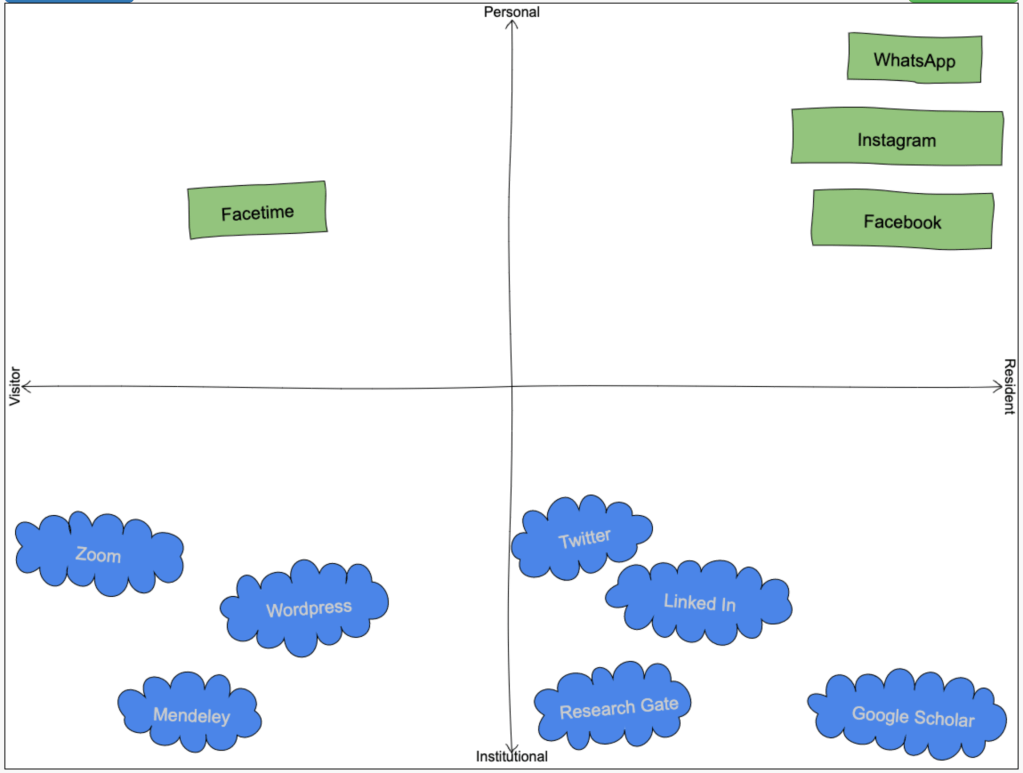
I think this can be a great tool in the online learning context for two reasons. First, it can help with our own digital literacy as teachers. From my own experience, if I’m not comfortable using a technology, I wouldn’t use it for teaching purposes. So this can be a great way to monitor our own progression through the use of different tools. Considering I’m now taking the “Facilitating Online Learning” subject that has encouraged me to start using (or re-activating) tools such as Twitter, WordPress and Flipboard, I’m curious to see which ones I’ll end up being more of a resident than a visitor over time.
Second, we can use it to better understand our students’ digital engagement. Their maps can be an opportunity to both discover new tools that we can use for educational purposes, and to identify gaps in students’ digital literacy relevant to their future workplace. This helps us to stay connected to our students and up-to-date with students’ needs (JISC Digital Insights, 2020).
References
JISC Digital Insights (2020). The student digital experience in 2020 https://digitalstudent.jiscinvolve.org/wp/outcomes/the-student-digital-experience-in-2020/
White, David S, & Le Cornu, Alison. (2011). Visitors and residents: A new typology for online engagement. First Monday, 16(9). https://doi.org/10.5210/fm.v16i9.3171
 Paula Galvão de Barba, PhD
@paula_barba I also found the V&R mapping exercise extremely illuminating! In fact, since completing my map and looking at others from the #EDUC90970 course I realise that there were many additional online tools that I use and didn’t include in my map!
I think its a great way to identify tools that might be useful in online teaching to develop an effective COI. Would you use the V&R map with students at the start of a course do you reckon? To identify what platforms they are using mostly? I feel pretty out of date with technology sometimes. Looking forward to massively expanding my awareness and expertise using new platforms (moving from V to R in some of these). And even using platforms I currently feel comfortable in, but in a more directed way to improve my teaching!
LikeLike
So true about going through other maps and finding out the tools that I forgot. I can’t believe I forgot about Dropbox! haha
I’m currently only teaching professional development workshops, so I don’t think it suits there. But I think it can be a good idea to use at the start of longer courses to see what students are up to. I would expect to see new names in the map each semester! And I think the map could also be a tool to explicitly address and register their progress in digital literacy required from them, as we are doing in the #EDUC90970 subject.
LikeLike
Interesting post Paula. I really like how you used the literature to tell your story. I am particularly impressed with how you apply the knowledge gained from the references in developing your own model. It has given me a sense of application of the many SOTEL approaches that we have. Well done… I better start learning from you 🙂
LikeLiked by 2 people
Thanks, Patrick. I’m looking forward to read your posts. From your introduction video, it seems like you have experience teaching online – looking forward to hear more about that too!
LikeLike
Paula,
Your post was the first I’d read covering the V&R distinction, and I have a confession – I got a laugh when I read that “…visitors see the web as a collection of tools to implement ideas created offline…” because when I created my first serious post, I typed it up, offline, using Microsoft Word and then pasted it into WordPress! I’m not proud…
i reckon that we will need the students to show us how to use some of the new technology. This is great for me since my V&R diagram is only going to have about three things on it (!) so if the students can instruct the teacher that will reduce my anxiety about going the way of the dodo.
My students in biostatistics tend to have later version of the software packages than I do, and even though I know how to use these packages very well, the students often show me nifty new things in the latest release, or task that I would have previously coded “manually” or done by hand (!) have been automated into proper routines.
Bye for now,
Lyle.
LikeLike
Hi Lyle, I do that too! I do blame my unstable Internet connection though. So I find myself doing some things offline then posting them online as a “safety” measure. And I agree that learning from students can be a good opportunity, but I reckon by the end of this subject you’ll be the one teaching us all. I already used your blog post to help me with Flipboard…!
LikeLike
Paula,
Flipboard continues to provides a few laughs into Week 4 of the subject.
First, I tried (and failed at first attempt) to create my own magazine, and ended up with two copies of #EDUC90970 under my list of “ALL” sites!
Second, it took a week for Jeanette’s confirmation email to arrive after she received and accepted the invitation from Thomas! But she did show me how to deal with the issue of choosing a picture to represent a WordPress site directly in WordPress, and I think I know how to do this in FlipBoard as well when “flipping” a site into #EDUC90970.
Perhaps I will knock up another “how to” post for Flipboard.
BTW I typed this directly into the text box without saving it anywhere beforehand. Life on the edge…
Lyle.
LikeLiked by 1 person
Hahaha life on the edge indeed! Looking forward to read that blog post. My blog still has no picture there!
And I would think Flipboard would automatically post our new posts using our feeds, but I guess that’s not happening… another Flipboard mystery to investigate?
LikeLiked by 1 person
Thanks so much for this post Paula – it is great to work with you again after Teaching in Practice last semester! It is so interesting to reflect on how different our White and Cornu’s Visitor and Residents (V&R) maps look – the map you have created looks so different compared to mine. For example, I use Zoom (synchronously and asynchronously) for all of my teaching online (Institutional – Resident), but also use it for communicating with friends and family (Personal – Resident). I decided to choose ‘resident’ for any technology where I was present socially as myself and interacted with others. My interpretation of ‘resident’ was based on the ‘social presence’ aspect of the online community of inquiry model (e.g., Garrison, 200; Tolu, 2013, etc.) So I distinguished whether or not I was a visitor or resident based on my social presence, rather than my skill/comfort with the technology. I wonder if this interpretation was appropriate?
I also noticed that the online tools and places on your V&R map were so much smaller than mine, I wonder if that is a reflection of you not spending too much time online? My map was full to the brim because I feel like so much of my institutional and personal space takes place online at the moment – I would definitely like it to be less! I am still drafting this blog with my map but will post it soon. Great to see you again Paula!
LikeLike
Hi Caitlyn, it is great to see you again in this subject! I really enjoyed your presentation on Zoom the other day.
About Visitor and Residents, I think using the social presence aspect to determine whether you are a visitor and or a resident makes sense and possibly provides a framework on how to actually become an “effective” Resident, that actually promotes social presence?
The size of my tools in my map were completely random. I thought I was going to have a lot so I started small and that continued… I think there is no rule about that – we can create our own I reckon. I really liked some of our colleagues approach on creating a taxonomy for it (e.g., Rebecca Morris @ https://rebeccalmorris.wordpress.com/2020/06/17/educ90970-developing-a-sense-of-presence-in-online-teaching/). On that, I found it interesting that the tools I forgot to add are the ones I use the most (e.g., Dropbox, Gmail). I guess that says a lot about how once a technology is truly embedded in our lives it becomes invisible to us!
LikeLike